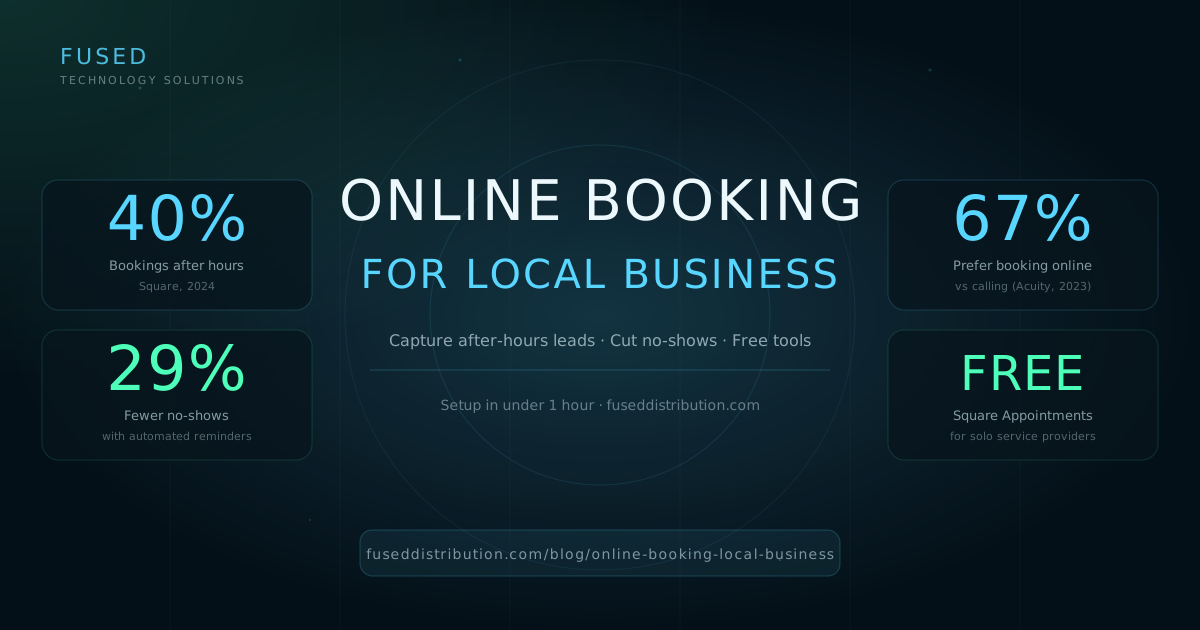
About 40 percent of service appointments get booked outside business hours, according to Square's 2024 Appointments data covering millions of bookings across service businesses in the USA. That means when you close for the night, a meaningful share of your potential customers are on their phones looking at someone else's booking page and picking a time that works for them.
This post covers what online booking actually does for a local service business, which free and low-cost tools work best depending on your trade, and exactly how to set it up so you're capturing those leads rather than missing them. Check out our guide on tracking your website with Google Analytics 4 to measure how much traffic your booking page actually receives once it's live.
Why Phone-Only Booking Costs You More Than You Think
In 2024, Square published appointment data from millions of USA service businesses showing that 40 percent of bookings occur between 6 PM and 8 AM when most solo operators aren't answering calls. A potential customer who can't book at 9 PM doesn't call back in the morning. They find someone who has a "Book Now" button and fills a slot before you open.
The phone-tag problem compounds. You call back, they're in a meeting. They call back, you're with a client. Each round-trip takes hours. Acuity Scheduling's 2023 consumer research found that 67 percent of consumers prefer booking a service appointment online rather than calling, specifically because they want to confirm the time immediately without playing phone tag. The preference skews higher for customers under 45.

There's also a trust signal most business owners don't think about. A booking page with real service names, durations, and prices tells a new customer more about how your business operates than a phone call does. It shows you're organized. That matters when someone is choosing between you and two other options they found on Google.
Which Booking Tool Should You Use?
Square Appointments is free for solo providers and the most complete no-cost option for trades, salons, and personal care businesses in the USA. It includes automated SMS and email reminders, a bookable website link you can add to your Google Business Profile, and no-show protection with optional deposit collection. For businesses with employees, pricing starts at $29 per month per location.
Calendly works well for consultants, coaches, and any business where "schedule a call" is the core conversion. The free tier gives you one meeting type and unlimited bookings. It's not built for service trades, but if your business sells time and expertise rather than a hands-on service, it's a clean option.
For salons, nail studios, and beauty businesses, Booksy and GlossGenius are worth the monthly fee. Both include their own customer-facing marketplace, which means your profile shows up to new customers searching for services in your area, not just people who already found your website. That dual function justifies the cost.
How to Set Up Online Booking in Under an Hour
Most local service businesses can have a booking page live within an hour. Here's the order that works: sign up, create your services, configure reminders, then add the booking link to every place customers find you.
- List each service separately with a real name, duration, and price. Don't use vague names like "Service A." Customers need to know what they're booking. If you offer a haircut and a haircut + color, list them as two separate items with two different durations.
- Add 15-minute buffer time between appointments. Every booking tool lets you set automatic padding. Use it. A client who runs 10 minutes over shouldn't make the next appointment late.
- Require a phone number. The whole point of reminders is sending a text. Make the phone number field required during booking, not optional.
- Set your cancellation window. 24 hours is standard. Square and Acuity both let you charge a cancellation fee if a booking is cancelled inside that window, which brings no-shows down further.
- Add the booking link everywhere. Your Google Business Profile "Book" button, your website header, your Instagram bio, your email signature. Anywhere a customer might look for you should have a direct path to booking.
How Automated Reminders Cut No-Shows by 29 Percent
In 2024, Square analyzed millions of appointments across USA service businesses and found that automated SMS and email reminders reduced no-show rates by an average of 29 percent compared to businesses using no reminders at all. The two-reminder sequence works better than a single message: a 24-hour reminder followed by a 1-hour reminder outperforms either message sent alone.
The mechanics are simple. A customer books a haircut for Thursday at 2 PM. They receive a confirmation immediately, a reminder Wednesday at 2 PM, and another reminder Thursday at 1 PM. No manual work from you. Most customers who would have forgotten simply show up. The ones who truly can't make it cancel early enough for you to fill the slot.
If you want to layer in text message follow-up after the appointment for rebooking or promotions, the SMS marketing follow-up system we covered works well as a second layer on top of your booking tool's built-in reminders.
What Booking Data Tells You About Your Business
Once you have a few months of booking data, you'll see patterns that are impossible to see from memory. Which services fill fastest. Which time slots go first. Which day of the week gets the most last-minute bookings. That data is in every booking tool's dashboard, and most owners never look at it.
Look at your no-show rate by service type. If one service has a 3x higher no-show rate than others, check your description and price. Vague service names and no upfront price listed lead to more no-shows because customers aren't fully committed when they book. Clear names, clear prices, and a small deposit option drop no-shows to near zero for most service categories.
Frequently Asked Questions
Sources
- Square, Appointments Data: After-Hours Booking Trends, 2024, squareup.com/us/en/appointments
- Acuity Scheduling, Consumer Preferences for Online Booking, 2023, acuityscheduling.com
- Square, No-Show Rate Reduction With Automated Reminders, 2024, squareup.com/us/en/appointments
- Booksy, pricing page, retrieved June 2026, booksy.com
- GlossGenius, pricing page, retrieved June 2026, glossgenius.com