Are you a small business owner struggling to get noticed online? You’ve invested in your business, built a great product or service, and now you need customers. One of the most effective and affordable ways to do that is through Bing Places for Business. This guide will walk you through every step of setting up your listing, ensuring you’re maximizing your visibility in the Bing search results and driving local customers to your door. At Fused Distribution, we specialize in helping local businesses like yours thrive online, and we’re here to make this process as simple as possible. Let's get started.
What to Know About Bing Places for Business
Bing Places for Business (formerly Bing Places) is a free tool that allows you to manage your business’s online presence on Bing. It’s a critical component of your local SEO strategy, often overlooked in favor of Google Business Profile. While Google dominates the search market, Bing still holds a significant share - approximately 16% of all searches in the US, according to a recent analysis. [1] Claiming and optimizing your Bing Places listing is essential for reaching a substantial segment of potential customers. It’s not just about being present; it’s about being found. A well-optimized listing can dramatically increase your chances of appearing in local search results, driving foot traffic, and boosting sales. Also, Bing’s algorithm prioritizes businesses with complete and accurate information, so taking the time to set it up correctly is a worthwhile investment.
How to Get Started: Claiming Your Listing
The first step is to claim your business listing. Here’s a breakdown of the process:

- Go to Bing Places for Business: Navigate to https://www.bingplaces.com/.
- Sign In: Use your Microsoft account (the same one you use for Outlook, Hotmail, or Xbox). If you don’t have one, create one.
- Search for Your Business: Type your business name into the search bar.
- Select Your Business: From the search results, click on your business listing.
- Claim Your Listing: If your business isn’t already claimed, you’ll see a “Claim This Business” button. Click it.
- Verify Your Identity: Bing will likely ask you to verify your identity through a phone call or email. Follow the instructions provided. This verification process is crucial for establishing ownership and ensuring the listing remains accurate.
Completing Your Business Profile - The Essentials
Once your listing is claimed, it’s time to fill out the details. This is where you’ll truly optimize your listing for local search.
- Business Name: Ensure this is exactly as it appears on your signage and other marketing materials. Consistency across platforms is vital for customer recognition.
- Address: Provide your full street address, including the city, state, and zip code. Accuracy is crucial for accurate map displays and directions.
- Phone Number: Use a phone number that you actively monitor. Consider using a Google Voice number for business inquiries to separate personal and business communications.
- Website: Link to your website. This is a vital connection for customers to learn more about your business and make purchases. Ensure the link is working correctly.
- Business Hours: Enter your accurate business hours, including any variations for different days of the week. Regularly update these hours, especially during holidays or special events.
- Category: Select the most relevant category for your business. Be specific. For example, instead of “Restaurant,” choose “Italian Restaurant” or “Mexican Restaurant.” A more specific category helps Bing understand your business and target the right audience.
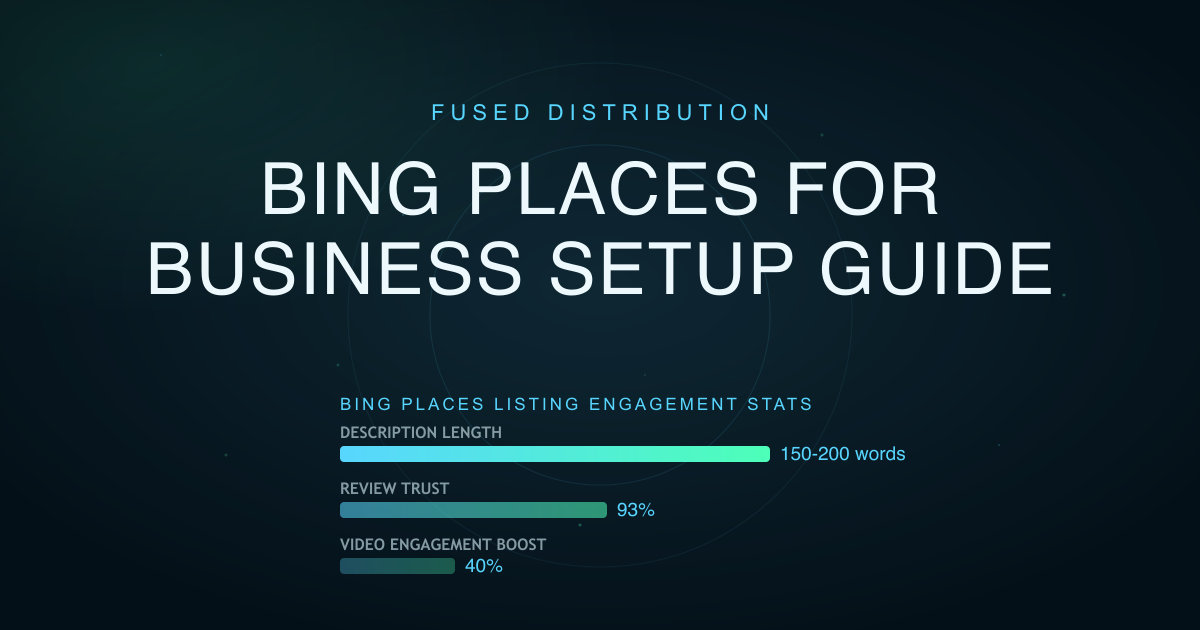
- Description: Write a compelling and informative description of your business. Include what you offer, your unique selling points, and any special promotions. Aim for around 150-200 words. Don’t just list features; tell a story about your business and what makes it special. Use keywords relevant to your industry and target audience.
Adding Photos and Videos - Visual Appeal Matters
Visuals are incredibly important for attracting customers. High-quality visuals significantly increase engagement and can improve your ranking.
- Upload Photos: Add high-quality photos of your business interior, exterior, products, and services. At least 10 photos are recommended, and ideally, a variety of images showcasing different aspects of your business. Consider professional photography for the best results.
- Add Videos: Videos can significantly boost engagement. Consider creating a short video showcasing your business, a tour of your location, or a customer testimonial. Studies show that businesses with videos in their Google Business Profile listings receive 40% more clicks than those without. [2] Videos can be uploaded directly to Bing Places or linked to YouTube videos.
Adding Services and Products - Be Specific
Don’t just list broad categories. Break down your offerings into specific services or products. This helps customers find exactly what they’re looking for. For example, if you’re a pizza restaurant, list each pizza type, toppings, and sizes. If you’re a hair salon, list the specific services you offer (e.g., haircuts, coloring, styling). The more detail you provide, the better you can cater to customer needs. For more on this, see Pay Per Click Vs Organic SEO For Small Business.
Managing Reviews - Reputation is Key
Reviews are a major factor in local search rankings. Encourage your customers to leave reviews on Bing Places. Respond to all reviews, both positive and negative, in a professional and timely manner. A high average rating can significantly boost your visibility. Research indicates that 93% of consumers trust online reviews as much as personal recommendations. [3] Proactively asking for reviews from satisfied customers is a powerful strategy.
Updating Your Information - Keep it Current
Regularly update your business information to ensure accuracy. This includes your hours, address, phone number, website, and any other details. Outdated information can negatively impact your ranking. Set a reminder to review your listing at least once a month. Bing Places actively monitors for changes, so staying on top of updates is crucial.
Using Bing Places for Business Insights
Bing Places for Business offers valuable insights into how customers are finding your business. You can track:
- Search Queries: See what keywords people are using to find your business. This data can inform your content strategy and help you target relevant keywords.
- Website Clicks: Monitor how many people are clicking on your website link from your listing. This indicates the effectiveness of your website link and the interest generated by your listing.
- Direction Requests: Track how many people are requesting directions to your business. This shows how many people are considering visiting your location.
- Views: Monitor how many times your listing is viewed. This provides a general sense of interest in your business.
Common Mistakes to Avoid
- Incorrect Information: Double-check all details for accuracy. Even small errors can hurt your ranking.
- Missing Information: Don’t leave any fields blank. Complete your profile as thoroughly as possible.
- Ignoring Reviews: Respond to all reviews, both positive and negative.
- Infrequent Updates: Keep your information current.
- Using Low-Quality Photos: Use clear, high-resolution images.
- Keyword Stuffing: Avoid excessively using keywords in your description. Focus on writing naturally and providing valuable information.
Conclusion - Take Action Today
Setting up and maintaining your Bing Places for Business listing is a relatively simple process that can yield significant results for your local business. By following the steps outlined here, you can increase your visibility in Bing search results, drive more traffic to your business, and ultimately, boost your sales. Don’t wait - claim your listing today and start connecting with local customers. At Fused Distribution, we’re here to help you every step of the way. Contact us today for a free consultation and let’s discuss how we can help you optimize your online presence. https://www.fuseddistribution.com/contact
Related
- Apple Maps Business Listing How To Claim It
- Pay Per Click Vs Organic SEO For Small Business
- Online Directories For Small Business Which Ones Matter
Read next: Apple Maps Business Listing How To Claim It